A field guide for founders, coaches, and operators who want an AI agent to protect their attention. Updated April 2026.
Why I wrote this
Chris Dixon once wrote, "what the smartest people do on the weekend is what everyone else will do during the week in ten years." Well all the smartest folks I know are building or have built some version of an AI Chief of Staff for themselves. I'm ready to do the same, so I spent a week mapping the AI Chief of Staff landscape because nobody else has. This is that map.
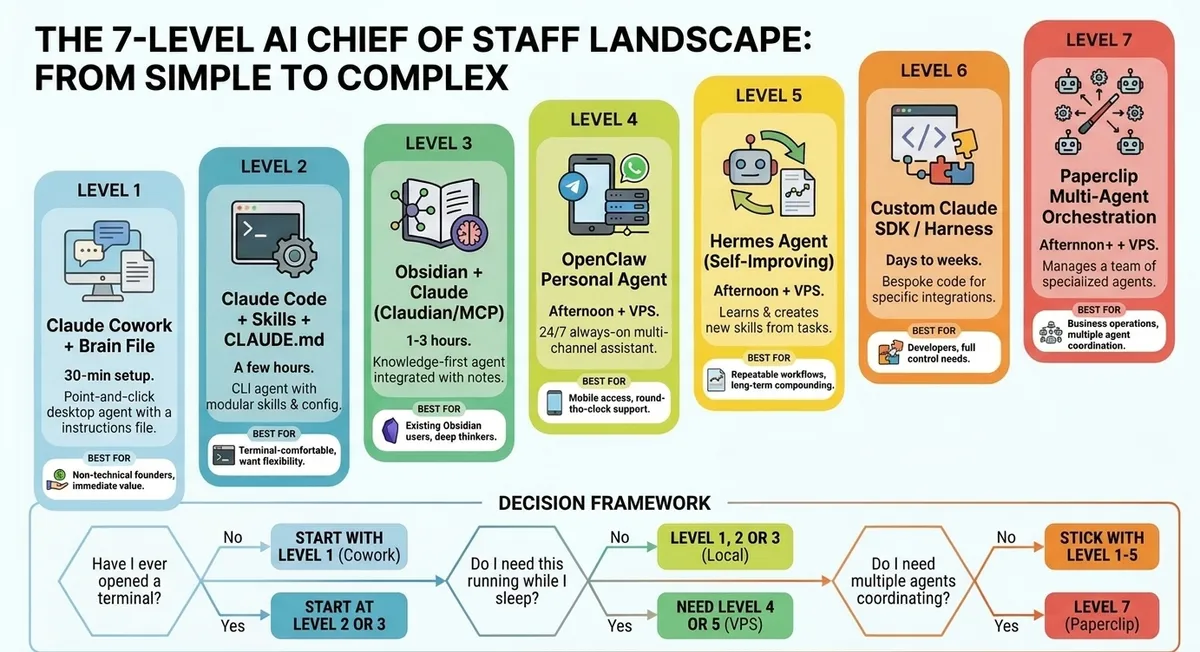
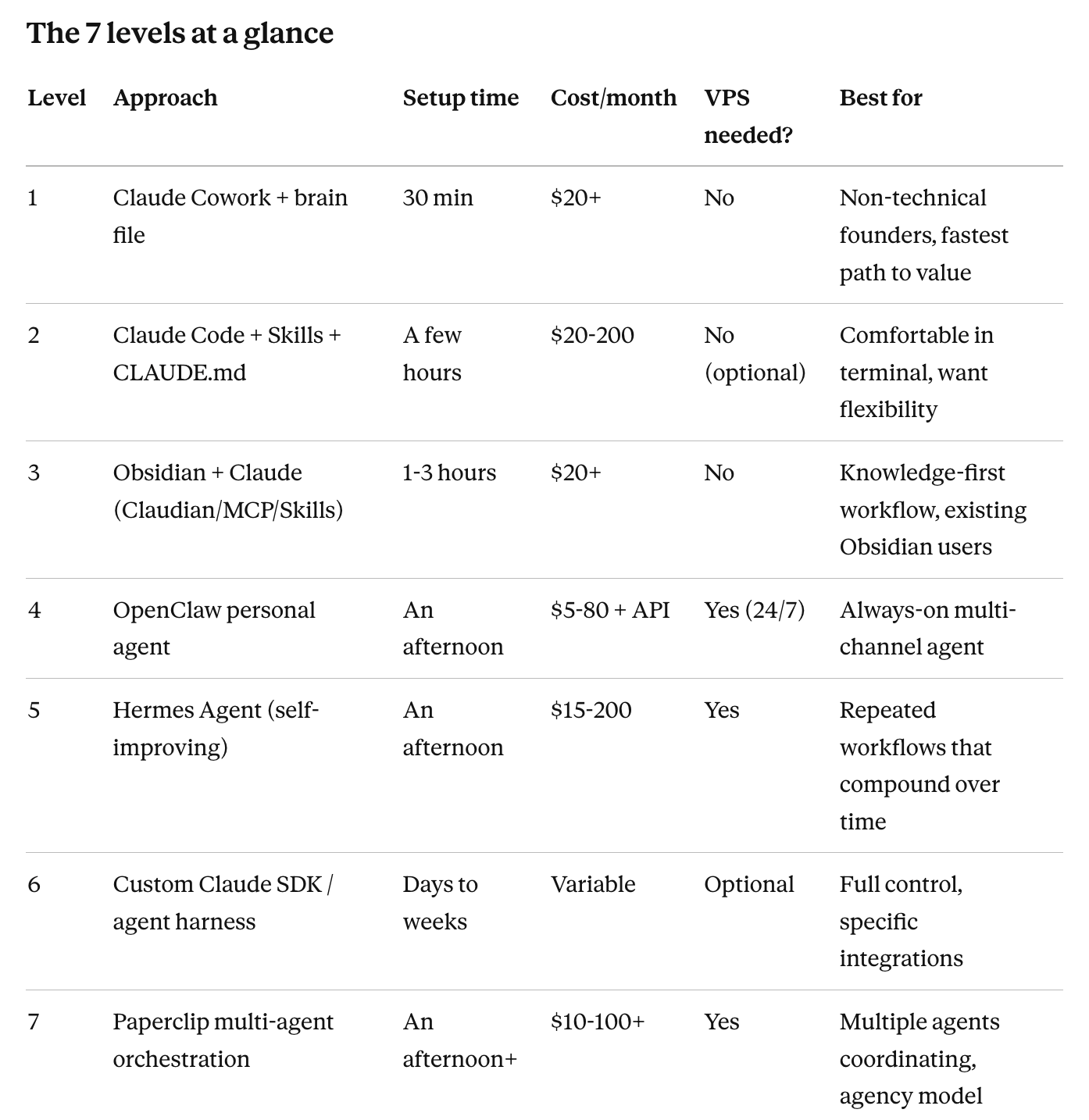
I'll cover seven approaches, organized from simplest to most complex, with real costs, real setup difficulty, and real recommendations from people running each one. Then I'll give you a three-question decision framework so you can stop reading and start building yourself and be one of the smartest folks yourself.
A note on framing: if you haven't read the previous post on the attention firewall concept, start there. The tools below are useless if you haven't decided what your AI Chief of Staff is actually for. Mine has one job: protect my writing time and my top three priorities, and tell me at any moment what the next highest-leverage move is.
Now, the landscape.
Level 1: Claude Cowork + a good prompt
The 30-minute path. Start here if you've never opened a terminal.
Claude Cowork is Anthropic's agentic desktop mode inside the Claude Mac and Windows apps. You point it at a folder, connect Gmail, Google Calendar, and Slack via built-in connectors, and give it a "brain file" that explains who you are, how you work, and what you want it to do.
Cowork launched in January 2026 as a research preview, went generally available in March, and is now available on Claude Pro ($20/month), Max ($100), and Max+ ($200) tiers. It runs locally on your Mac or Windows machine. No code, no terminal, no VPS.
How JJ Englert built a daily operating system in Cowork
The clearest non-technical walkthrough I found is JJ Englert's episode on Lenny's "How I AI" podcast. JJ runs enablement at Tenex and built what he calls a "daily operating system" entirely in Cowork. The architecture:
- A Markdown "brain" file that contains his working preferences, team members, communication style, and links to key documents. Cowork reads this at the start of every task.
- Reusable Skills with explicit good and bad examples. When he gets a draft email he loves, he saves it as a "good" example. When he gets one that's off-brand, he saves it as a "bad" example with a note.
- Morning, midday, and evening "sessions" where Cowork drafts emails, plans the day, runs check-ins, and coordinates across his tools.
The whole thing took an afternoon to set up and it now runs his daily workflow.
JJ's main insight: don't think about AI doing tasks for you. Think about building an "anti-to-do list" of work you never want to do again, then automate it one piece at a time.
The Viable Edge AI Employee template
If you don't want to build your brain file from scratch, Viable Edge has a free Cowork prompt that gets you most of the way there. It does three things automatically:
- Checks which connectors (Gmail, Google Calendar, Slack, Airtable) are active in your Cowork project, and blocks progress until email and calendar are wired in.
- Creates a CLAUDE.md project instructions file plus a daily-handoff.md living document for rolling context.
- Sets up optional modules for daily briefings, meeting prep, task tracking, CRM/pipeline, and scheduled sessions.
Adam Sandler shared this one in my LinkedIn thread, and it's the fastest possible on-ramp.
Costs and tradeoffs
- Setup: 2/5 difficulty. Mostly copy-paste and clicking through OAuth flows.
- Cost: $20/month minimum (Claude Pro). $100-200 if you're a heavy Cowork + Claude Code user.
- Maintenance: Low to medium. Brain file gets refined over time. Connector permissions occasionally need refresh.
- Limitation: Cowork only runs when your Mac is on. Not 24/7. Great for on-demand workdays, not for overnight automation.
Best for: Non-technical founders who want immediate value. This is where I'm starting.
Level 2: Claude Code + Skills + CLAUDE.md
A few hours of setup. Start here if you're comfortable in a terminal and want flexibility.
Claude Code is Anthropic's CLI agent. Originally built for coding, it's now widely used as a general-purpose personal agent because it has filesystem access, bash, MCPs, and the Agent Skills system.
The dominant pattern for turning Claude Code into a Chief of Staff combines:
- CLAUDE.md at the root of your project. This is the high-level brain file: who you are, what your strategy is, what data sources matter.
- Skills as modular capabilities. Each skill is a directory with a SKILL.md describing what it does, plus optional scripts and resources. When a request matches the description, Claude loads the skill automatically.
- Subagents for specialized work that the main agent invokes (like a research subagent or financial analysis subagent).
The repos that matter
- everything-claude-code/agents/chief-of-staff.md — A drop-in agent definition that triages messages into four tiers (skip, info-only, meeting info, action required), generates draft replies, and uses calendar data for scheduling. This handles 80% of the email triage logic out of the box.
- Anthropic's Agent SDK Chief of Staff cookbook — Official example showing how to organize CLAUDE.md plus per-subagent definitions under .claude/agents/. Includes a financial analyst subagent.
- awesome-claude-skills — Curated list of skills and resources. The fastest way to find skills others have already built.
- claude-starter (raintree-technology) — Template repo with 40+ skills, meta-commands, and workflow automation.
Noah Brier's second-brain workflow
The canonical example of Claude Code as a Chief of Staff is Noah Brier's setup, detailed on Every's "How to Use Claude Code as a Second Brain" podcast. Noah runs Claude Code on a home server attached to a VPN, mounted on an Obsidian vault with about 1,500 notes. He accesses it from his phone via a terminal app and Tailscale.
What makes Noah's setup powerful:
- Claude reads and writes to the vault continuously, building a running log of his ideas and projects.
- He often tells Claude it's in "thinking mode" to encourage questions rather than immediate text generation.
- He can pause deep work and come back later: "catch me up on the last three days of research."
- His phone becomes a remote control for an always-on personal AI system.
Noah commented on my LinkedIn post with the simplest possible advice: "skip the posts, just open Claude Code and start building." Coming from him, that's earned wisdom. The system you build for yourself is always better than the framework someone else designed.
Costs and tradeoffs
- Setup: 3-4/5 difficulty. Installing Claude Code is easy; configuring CLAUDE.md, skills, and remote access takes time.
- Cost: $20-200/month. Claude Pro is enough for local use. Heavy users move to Max ($100-200). Add API credits if you hit rate limits.
- Maintenance: Medium. Skills and toolkits evolve quickly. Iterating on CLAUDE.md is ongoing.
- Runtime: Local laptop or remote server. Most power users (Noah included) run on a home server or VM for 24/7 access from mobile.
Best for: Founders comfortable with the terminal who want a system they can shape and grow.
Level 3: Obsidian as your knowledge layer
1-3 hours of setup. Start here if you already live in Obsidian or want a single source of truth.
If you want your AI Chief of Staff to think WITH your notes, not just manage your inbox, Obsidian is the move. You get a local-first Markdown vault that's also Claude's working directory.
There are three approaches, simplest first:
3a. Claudian plugin (chat-first)
Claudian embeds Claude Code as a sidebar chat in Obsidian. It has 6,900 GitHub stars. You install three files into your Obsidian plugin folder, enable it, and chat with Claude from your vault. It has full agentic capabilities: read, write, search, bash, multi-step workflows. It supports slash commands, custom instructions, and MCP servers.
The Productory non-technical guide walks through installation in about 20 minutes. Auto-updates available via the BRAT plugin.
3b. obsidian-skills (essential addition)
Kepano's obsidian-skills is 44 official Claude-compatible skills built by Obsidian's CEO. 14,900 GitHub stars in under three months, which tells you how fast this space is moving. The skills teach Claude how to correctly read and write Obsidian Markdown, base databases, canvas files, and more.
You drop the repo into your .claude folder and Claude Code applies them automatically when working with Obsidian files. This fixes the formatting weirdness you'd otherwise get when AI agents touch your vault. If you're using Claude Code with Obsidian, this isn't optional. It's essential.
3c. MCP server approach (most powerful)
The Model Context Protocol (MCP) approach gives Claude structured access to your vault as a set of tools. Most setups use the Obsidian Local REST API plugin plus an MCP Obsidian server (like iansinnott/obsidian-claude-code-mcp).
This is more powerful than Claudian because Claude Desktop or any MCP-compatible agent can connect. The tradeoff is more setup: you'll need Python, configure ports, edit Claude Desktop's MCP config file. Plan on 1-2 hours and some tolerance for debugging.
Costs and tradeoffs
- Setup: Claudian 2/5, obsidian-skills 3/5, MCP servers 4/5.
- Cost: Same as Claude subscription ($20+/month). Obsidian itself is free.
- Maintenance: Low to medium for Claudian. Medium for MCP setups (more moving parts).
- Runtime: Local. Works offline for the vault itself; needs internet for Claude API calls.
Best for: Knowledge workers who already think in Obsidian or want to. Saadiq Rodgers-King in my LinkedIn thread runs a version of this with CLI bridges to email, calendar, and Slack feeding into the vault.
Level 4: OpenClaw personal agent
An afternoon plus a $5-50 VPS. Start here if you want a 24/7 always-on agent on Telegram or WhatsApp.
OpenClaw is the open-source agent framework that exploded in early 2026. Created by Peter Steinberger (formerly Clawdbot, then Moltbot, now OpenClaw after some trademark drama with Anthropic), it now has 250K+ GitHub stars. It runs as a gateway process that connects an LLM to messaging platforms (Telegram, WhatsApp, Discord, Slack, iMessage) and your local files.
The killer feature: it runs 24/7 on your machine or a cheap VPS, and you talk to it from your phone via WhatsApp or Telegram. It's the next closest thing to having an actual assistant who never sleeps. Just imagine also that that assistant might, I don't know, nuke your entire gmail account. Proceed with curiosity and caution for now.
The CoS-specific starter: snarktank/clawchief
The repo to know is snarktank/clawchief, a public OpenClaw starter kit explicitly built for the founder/Chief of Staff use case. It includes:
- A clawchief/ source-of-truth layer for priorities and task state
- Meeting-note policy
- Action policy (what the agent can do autonomously vs. what needs approval)
- EA and business-development skills
- Cron templates for scheduled work
If you're going the OpenClaw route, this saves you weeks of figuring out the structure yourself.
The SOUL.md concept
OpenClaw uses a file called SOUL.md to define the agent's voice and personality. The official docs say to keep it short, sharp, and behaviorally consequential. Lines like "Be genuinely helpful, not performatively helpful" or "Have opinions" change response style dramatically. Start with 200 words and iterate based on a week of behavior tests.
The Ultimate Guide to Writing SOUL.md is the best deep dive on this.
A real CoS in action
The most useful walkthrough of an OpenClaw CoS in production is Showing you my OpenClaw AI Chief of Staff (R Mini Arnold). It covers the morning brief workflow, overnight research and code generation, hardware/software stack, and the SOUL.md spec. Watch this before you commit to OpenClaw.
From my LinkedIn thread
Craig Hepburn called OpenClaw "by far the most powerful and useful" option but warned it requires patience and expertise. Nick Panama spent a weekend building one and got it working but flagged the challenge of "using Claude Code to debug all of the various connections to Gmail, Outlook, Granola, Obsidian, etc." Robelen Ryan went a related route with Hermes (more on that below) and reported it took a couple of hours and now lives in her Slack.
Costs and tradeoffs
- Setup: 3-4/5 difficulty. Node.js, OpenClaw CLI, plugin configuration. Doable but not point-and-click.
- Cost: $5-80/month for VPS hosting plus model API costs. Self-hosted with budget models can be cheap; frontier models cost more.
- Maintenance: Medium. Gateway process, Node version management, plugin updates, log monitoring.
- Runtime: Best on a VPS for 24/7. Can run locally but you lose the always-on benefit.
Best for: Founders who want their CoS reachable from their phone via Telegram or WhatsApp at all hours.
Level 5: Hermes Agent (the self-improving one)
An afternoon plus a VPS. Start here if your workflows repeat and you want them to compound.
Hermes Agent is Nous Research's open-source agent. 33K+ stars, released in February 2026. It does one thing nobody else does: a built-in learning loop.
After completing a task, Hermes:
- Reflects on what worked and what didn't
- Generates a reusable skill document
- Stores it
- Loads it next time a similar task appears
The promise: the agent literally gets better the longer you use it. Skills compound. Token usage drops over time because Hermes loads only the relevant skill instead of stuffing every possible tool into the prompt.
How it compares to OpenClaw
OpenClaw is breadth: many channels, many skills, control-plane oriented. Hermes is depth: one agent that gets smarter through repeated use. They're solving different but related problems.
If you have a hundred one-off tasks across many channels, OpenClaw fits better. If you have ten workflows you'll run hundreds of times each (daily briefings, recurring research, weekly reviews), Hermes compounds in ways OpenClaw doesn't.
Migration is easy: hermes claw migrate imports your OpenClaw setup automatically. Many people are running both.
The honest tradeoff
The learning loop is real but requires more technical comfort to maintain. You're monitoring skill quality, occasionally pruning bad skills, upgrading versions. Hermes is for people who will invest in the system over months, not weeks.
Costs and tradeoffs
- Setup: 4/5 difficulty. One-line installer, but VPS provisioning and model configuration add complexity.
- Cost: $15-200+/month. $5-80 for VPS plus API. Light users on budget models stay cheap; heavy use on frontier models adds up.
- Maintenance: Medium-high. Learning loop creates leverage but requires monitoring.
- Runtime: VPS strongly recommended.
Best for: Operators with repeatable workflows who want their CoS to get smarter over time.
Level 6: Custom Claude SDK / agent harness
Days to weeks of building. Start here if you have specific integration needs and full control matters.
This is the path Ben Niehaus described in my LinkedIn thread: skip all the frameworks, build a bespoke agent on the Claude SDK. His stack includes Telegram for capture, Whisper for voice transcription, Claude SDK for reasoning, and Obsidian for storage.
Why go this route? Because every framework above makes opinionated choices that may not fit your specific workflow. If you have a particular set of integrations (a custom CRM, a niche tool, a specific data source) that nobody's built a connector for, building it yourself is sometimes faster than wrestling with a framework that almost-but-not-quite fits.
The bonus, as Ben noted: it can run on your existing Claude subscription without separate API billing.
When this makes sense
- You have a hyper-specific workflow nobody else has solved
- You're a developer or have one on call
- You want full control over what the agent can and cannot do
- Your existing tools require custom integration work anyway
When it doesn't
- You haven't yet defined what you want the agent to do
- You're hoping to outsource the building to ChatGPT or Claude Code
- You don't have time to maintain a custom system
Costs and tradeoffs
- Setup: 5/5 difficulty. You're writing code.
- Cost: Variable. Can be cheap if you ride your Claude subscription, expensive if you pay per API call.
- Maintenance: High. You own everything that breaks.
- Runtime: Whatever you build it for.
Best for: Developers and technical operators with specific needs that frameworks don't address.
Level 7: Paperclip multi-agent orchestration
An afternoon plus a VPS. Start here only if you're running multiple agents already.
Paperclip is the most ambitious project in this space. 52K+ GitHub stars and counting. It's not an agent. It's a company of agents.
You define an org chart (CEO agent, CTO agent, Research agent, Marketing agent), assign each one a role and budget, give them goals, and Paperclip coordinates the work. Org charts, budgets, governance, audit logs, rollback. It integrates with whatever agent you bring (Claude Code, OpenClaw, Codex, custom scripts).
When you actually need this
If you have one Chief of Staff handling email and content drafting, you don't need Paperclip. It's overkill.
If you're running five agents across content production, outreach, research, code, and operations, and you've ever woken up to a $400 API bill because one of them got stuck in a loop, Paperclip is built for you. The cost-control system alone (per-agent monthly budgets, automatic shutoffs) tackles the most pressing real-world problem of running AI agents at scale.
Craig Milligan in my LinkedIn thread mentioned using Paperclip for "Business structured and coordinated agent operations" alongside Hermes for personal workflows. That's the right framing: Paperclip is for business operations, not personal CoS.
Costs and tradeoffs
- Setup: 4-5/5 difficulty. Node.js, VPS, multiple agent backends, environment configuration.
- Cost: $10-100+/month for VPS plus API costs across all integrated agents.
- Maintenance: Medium-high. Multi-agent systems mean multi-agent failure modes.
- Runtime: VPS required for 24/7.
Best for: Operators running multiple agents who need a control plane.
The decision framework
Three questions:
1. Have you ever used a terminal?
- No → Start at Level 1 (Cowork). Don't even look at the others yet.
- Yes → You can start at Level 2 (Claude Code) or Level 3 (Obsidian) depending on whether you live in notes.
2. Do you need this running while you sleep?
- No → Cowork or Claude Code on your laptop is fine. You're done.
- Yes → You need Level 4 (OpenClaw) or Level 5 (Hermes) on a VPS.
3. Are you running multiple agents that need to coordinate?
- No → Don't look at Paperclip. Seriously.
- Yes → Level 7 (Paperclip) is the only thing that solves this.
Most solo founders end at question 2. You don't need a VPS. You don't need a multi-agent orchestration platform. You need Cowork, a brain file, and a Gmail connector.
Start there. Graduate when you actually feel the pain that the next level solves.
What I'm doing
I'm starting at Level 1 but I imagine I'll get to L3 over the next month. Cowork on my Mac, Viable Edge template, my highest-traffic Gmail account, and the six-stream email classification I described in the previous post.
The constraint that's making this interesting: I have nine Gmail accounts, all funneling into Apple Mail. No labels. No system. Whatever I build has to handle that mess.
Next post: what happened when I actually tried it.
If you're following along and want to share what you're building, find me on LinkedIn. Every commenter I named in this post helped shape it. I'd love to keep the conversation going.
Further reading
The original LinkedIn thread that started this: [link to your post]
Tutorials and walkthroughs:
- Lenny's "How I AI" Claude Cowork episode with JJ Englert
- Every's "How to Use Claude Code as a Second Brain" with Noah Brier
- Showing you my OpenClaw AI Chief of Staff (R Mini Arnold)
- Productory: Obsidian + Claude Code Non-Tech Guide
Templates and starter repos:
- Viable Edge AI Employee Cowork prompt
- everything-claude-code chief-of-staff agent
- Anthropic Agent SDK Chief of Staff cookbook
- snarktank/clawchief OpenClaw starter
- kepano/obsidian-skills
- Claudian Obsidian plugin
- awesome-claude-skills
The frameworks themselves:
Tarikh Korula is an executive coach for venture-backed founders and a 3x founder. He coaches CEOs, CTOs, and operators from Seed through Series C. This post is part of an ongoing series on building an AI Chief of Staff in public. Follow along on LinkedIn or subscribe to the Wisdom newsletter.